Look, I know you saw that repo with 135K stars and thought “damn, this must be good.” I thought the exact same thing. So I tore apart all 36 skills in there and tested whether they actually do what they promise. Here is what I found: no fluff, just real breakdown.
Wait, What Even Are “AI Skills”?
Before we dive in, let’s get the core concept straight.
Imagine you hire a sharp assistant. But when you tell them “build me a website,” they immediately start typing code without asking you a single question. They don’t ask what colors you want, who your users are, or whether you need an auth system. They just build blindly.
That’s an AI without skills.
Now imagine you hand that same assistant a playbook before they touch the keyboard. The playbook says:
- First, interview the user about what they actually need.
- Then write tests before writing any implementation code.
- Review your own work before presenting it.
That’s an AI with skills. It’s simply a markdown document that instructs the AI on how to operate for a specific workflow.
Matt Pocock created a collection of these playbooks. Some are genuinely brilliant. Some are, well, like buying a sports car and finding out it has no engine inside.
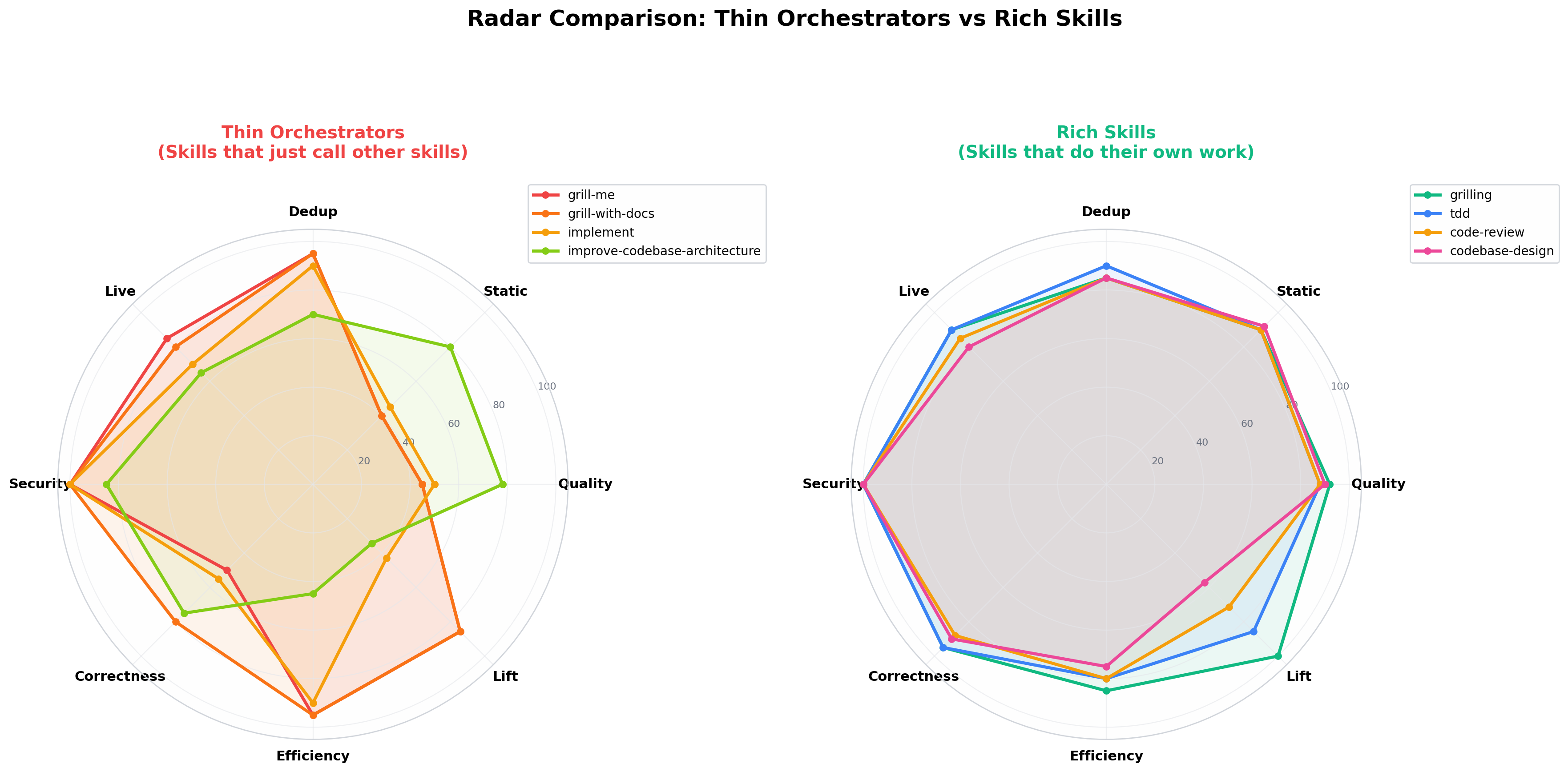
36 Skills: The Big Picture
Why Did I Test These?
Before getting carried away by star counts, there is one question worth answering: why analyze them in the first place?
Because popular does not mean bulletproof.
Matt’s repository has over 135,000 stars. Thousands of developers use these skills daily. That is real community proof, and these skills clearly offer value.
But star counts don’t tell you which skills do the heavy lifting, which ones are along for the ride, or whether they hold up under real development pressures.
So I put them through an evaluation framework similar to what enterprise teams use for AI agents:
- Tier 1 (Static Analysis): Does the structure look solid under the hood?
- Tier 2 (Duplicate Detection): Is it an original workflow or just a thin wrapper?
- Tier 3 (Workflow Testing): Does the skill actually produce the promised outcome?
Here is how Matt’s skills scored.
The Audit Numbers
What Passed (The Good News)
| Check | Result | What This Means In Practice |
|---|---|---|
| Formatting & Structure | 36/36 passed | Clean, well-structured markdown files |
| Safe Commands | 36/36 clean | No dangerous destructive scripts |
| Secrets & Keys | 36/36 clean | No leaked API credentials or keys |
| Link Integrity | 36/36 passed | Internal cross-references resolve cleanly |
The skills are properly formatted and safe to run. That is like a restaurant having clean plates: necessary, but you still care about the food.
What’s Missing (The Reality Check)
| Check | Result | What This Means In Practice |
|---|---|---|
| Automated test cases | 0/36 | No automated tests to catch regressions |
| Benchmark reports | 0/36 | No documented with-vs-without metrics |
| Negative trigger tests | 0/36 | No guardrails against triggering at the wrong time |
| Version locking | 0/36 | Changes to base skills can break dependent skills silently |
Translation: These skills work, and thousands of developers vouch for them. But there is no automated test harness. They are battle-tested by human trial and error.
That means:
- When they work, it is because users figured out the nuances manually.
- When they break, you only find out while actively coding.
- There is no automated CI pipeline confirming that an update didn’t regress an existing workflow.
The Crown Jewels: Skills That Actually Change How You Work
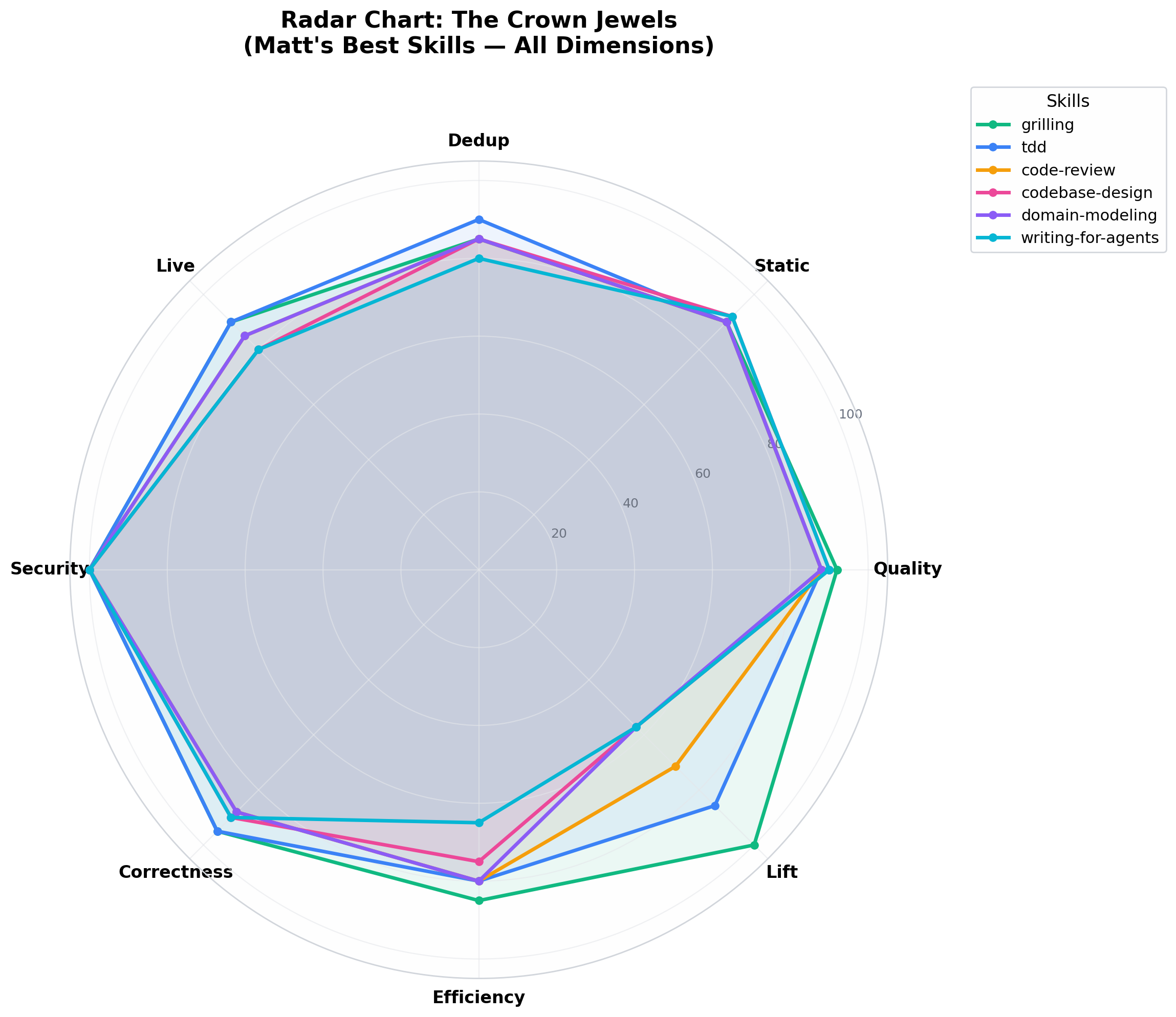
1. grilling: The Structured Interviewer
What it does: Before touching code, the AI interviews you. Not like an unstructured chat where it repeats random questions, but in a strict dependency sequence.
Why it’s brilliant: If you are planning a trip, an undisciplined AI asks “beach or mountains?” before checking if you have a passport or a budget. grilling forces the AI to resolve prerequisite questions first. It follows a clean dependency chain (a frontier algorithm for conversations).
The numbers: Quality 92/100 (A-). Estimated workflow lift: +35%. Completely self-contained.
The verdict: Without this, the AI starts writing code immediately and often builds the wrong feature. With this, it spends 5 minutes clarifying requirements first, saving hours of refactoring. This is the strongest skill in the entire repo.
2. tdd: Test-Driven Development That Teaches
What it does: Forces the AI to write failing tests before implementing features (Red -> Green -> Refactor).
Why it’s special: Most generic TDD prompts simply say “write tests first.” That is too vague. Matt’s skill goes deeper by teaching the AI what bad tests look like:
- Implementation-coupled tests: Tests that break during routine refactoring even when user-facing behavior never changed.
- Tautological tests: Tests that merely duplicate the implementation logic instead of asserting behavior.
- Horizontal slicing: Writing all tests upfront without validating individual feedback loops.
The numbers: Quality 88/100 (B+). Estimated workflow lift: +30%.
The verdict: The AI writes tests that assert behavior instead of fragile implementation details. When you refactor later, the tests remain reliable.
3. code-review: Dual-Track Reviewing
What it does: Evaluates code changes across two independent perspectives simultaneously:
- Standards track: Code cleanliness, project conventions, and smell detection.
- Spec track: Verifies whether the change actually fulfills the requested feature ticket.
Why it matters: Most reviews catch either code formatting or logic errors, rarely both. This prompt runs two evaluation paths so they don’t bias each other.
The numbers: Quality 88/100 (B+). Estimated workflow lift: +25%.
The Thin Wrappers: Skills That Do Almost Nothing
Now let’s talk about the weak spots in the collection.
Some skills in the repository are essentially one-line redirects:
| Skill | File Size | What It Actually Does | If The Core Skill Breaks |
|---|---|---|---|
grill-me |
157 bytes | “Call the grilling skill” | Completely broken |
grill-with-docs |
247 bytes | “Call grilling + domain-modeling” | Completely broken |
implement |
433 bytes | “Use TDD, then code-review, then commit” | Severely degraded |
At 157 bytes, grill-me is just a pointer note. For comparison, grilling is nearly 2KB of detailed instructions that do all the heavy lifting.
Because there is no version locking, if grilling changes its format or naming, these wrapper skills can fail silently without warning.
The Over-Engineered One: improve-codebase-architecture
This skill sounds great on paper. It claims to scan your codebase, identify structural issues, and output an interactive HTML report.
The reality:
- It injects 24,500 tokens into context before reading any of your project code (nearly 20% of a standard context window).
- Over 6KB of the skill is dedicated to styling HTML, Mermaid diagrams, and SVGs.
- The model often spends more compute formatting presentation markup than reasoning about system design.
The verdict: Skip the bloated HTML report. Ask for a clean Markdown architecture review instead. You get the same technical insights at a fraction of the token budget.
What Is Missing for Production Readiness
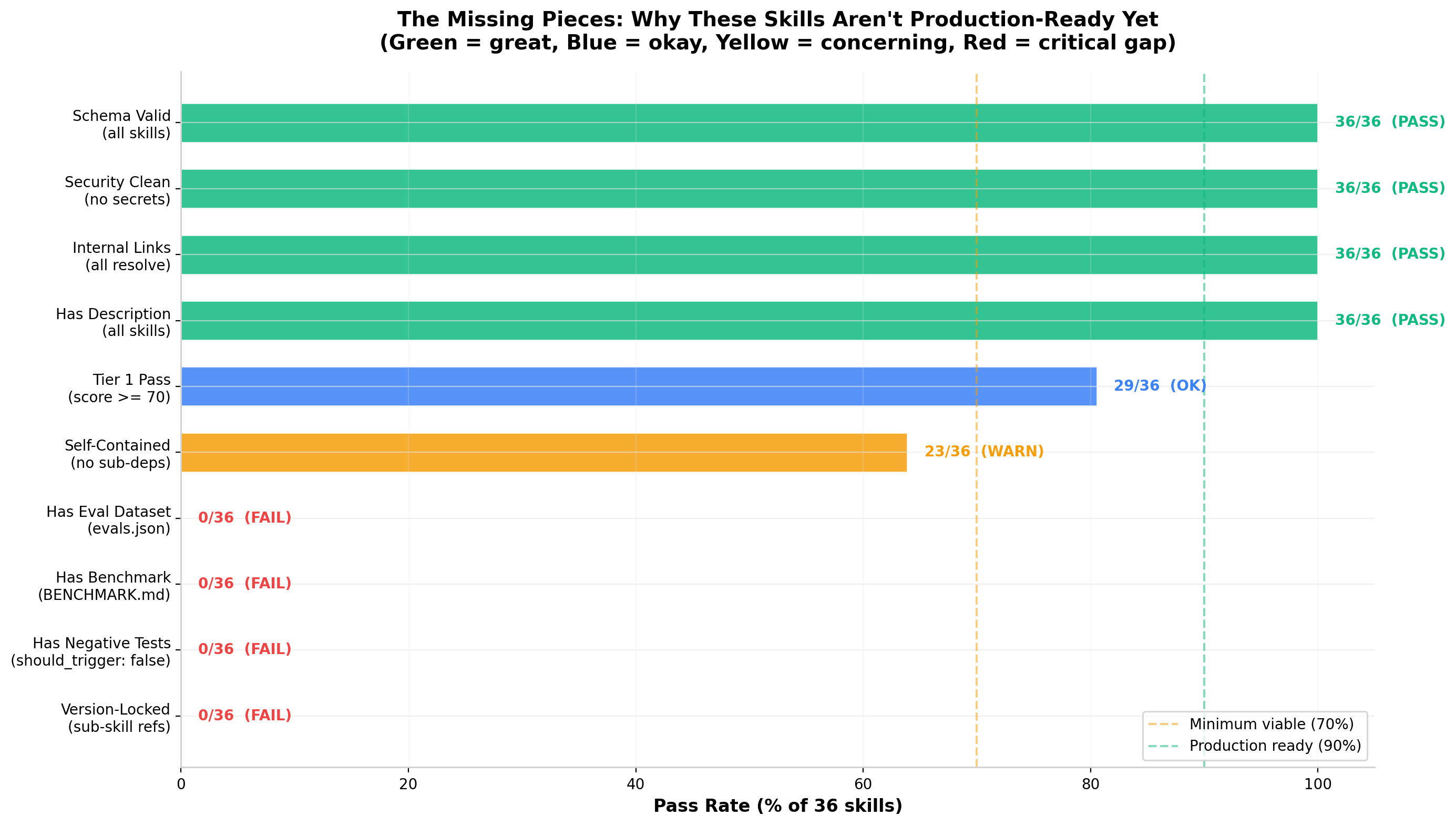
The production readiness evaluation across the 36 skills.
- Zero Automated Evaluation Suites: None of the 36 skills include machine-readable eval sets to test for prompt regressions across model updates.
- Missing Negative Triggers: Model-invoked skills lack explicit conditions for when not to activate (e.g., triggering a full TDD cycle for a one-line typo fix).
- Implicit Dependency Chains: Skills reference other skills by name without pinned versions.
Which Skills Should You Actually Use?
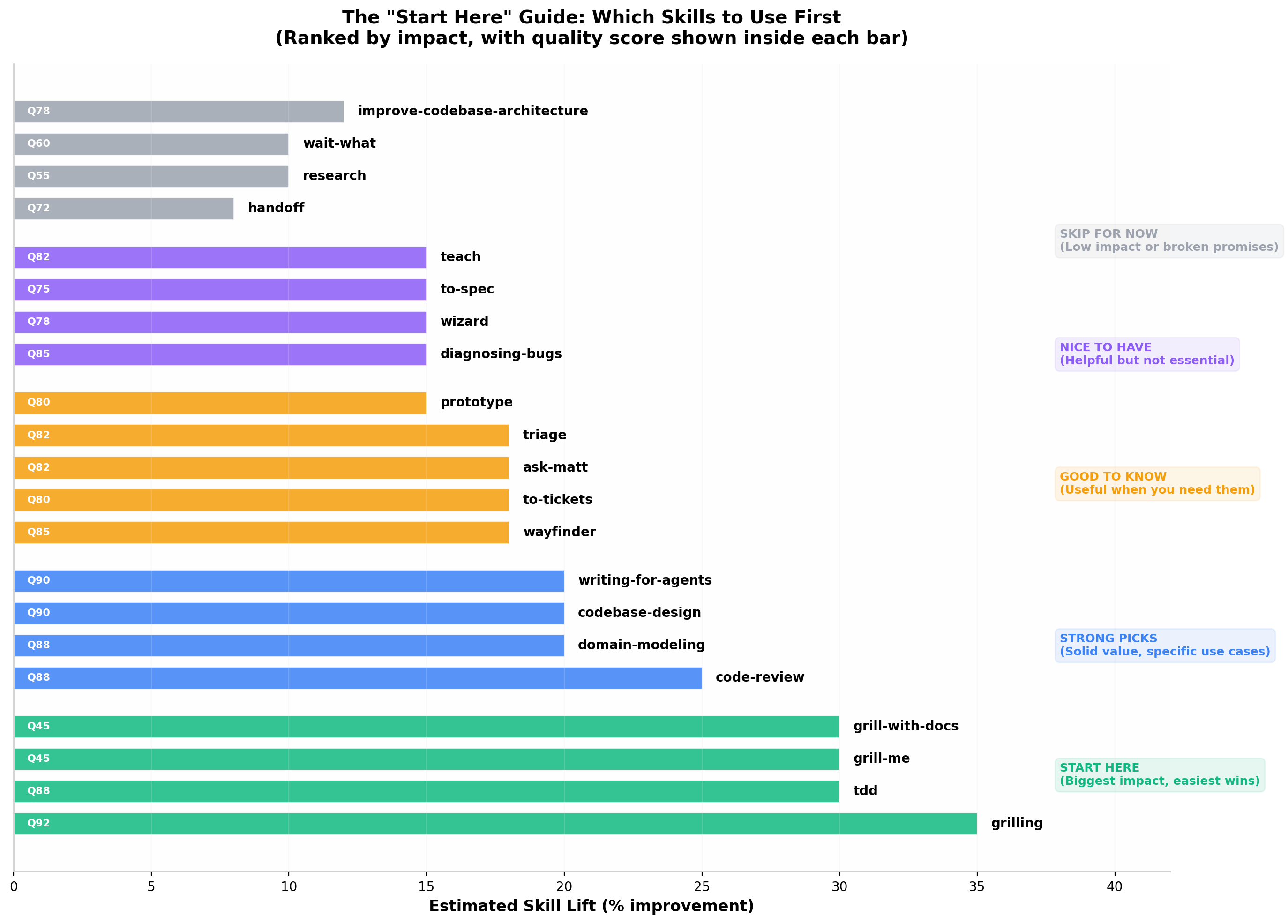
Recommended adoption order.
For Individual Developers
/grill-me(orgrilling): Use this to nail down requirements before writing code./tdd: Enforces strict test-first development with clean assertions./code-review: Catches spec discrepancies and stylistic issues before committing./domain-modeling: Great for establishing clear naming conventions across features.
For Teams
- Recommended:
grilling,tdd,code-review,domain-modeling,codebase-design. - Use with caution:
wayfinder(useful for deep exploration, but context-heavy). - Skip:
improve-codebase-architecture(too token-heavy) and thin wrapper skills (invoke base skills directly).
Hype vs Reality
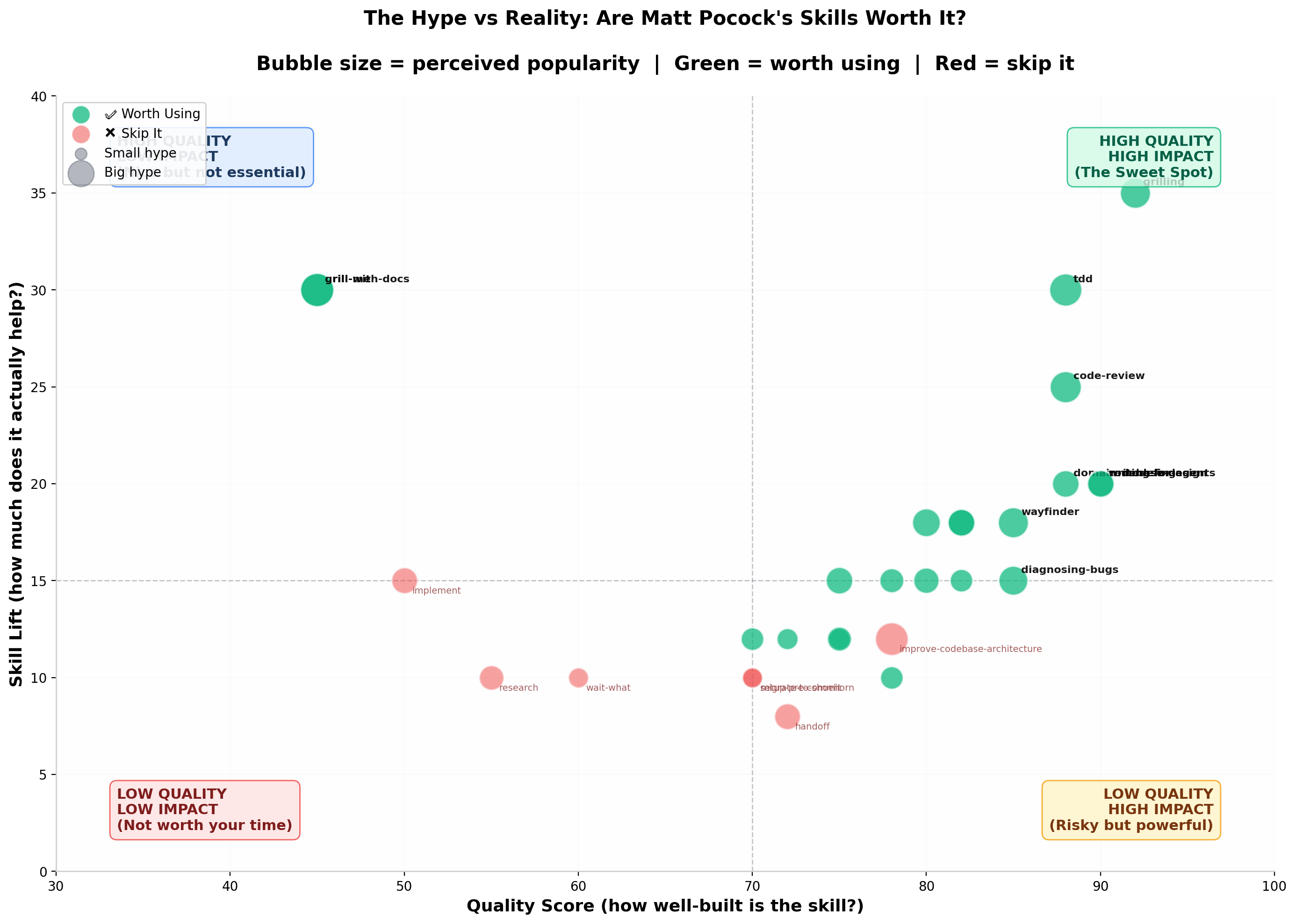
- High Quality & High Impact:
grilling,tdd,code-review. - High Impact via Delegation:
grill-me,grill-with-docs(work well only because they callgrilling). - Niche Reference Material:
codebase-design,writing-for-agents. - Low Value:
implement,research,handoff.
Cost vs Value
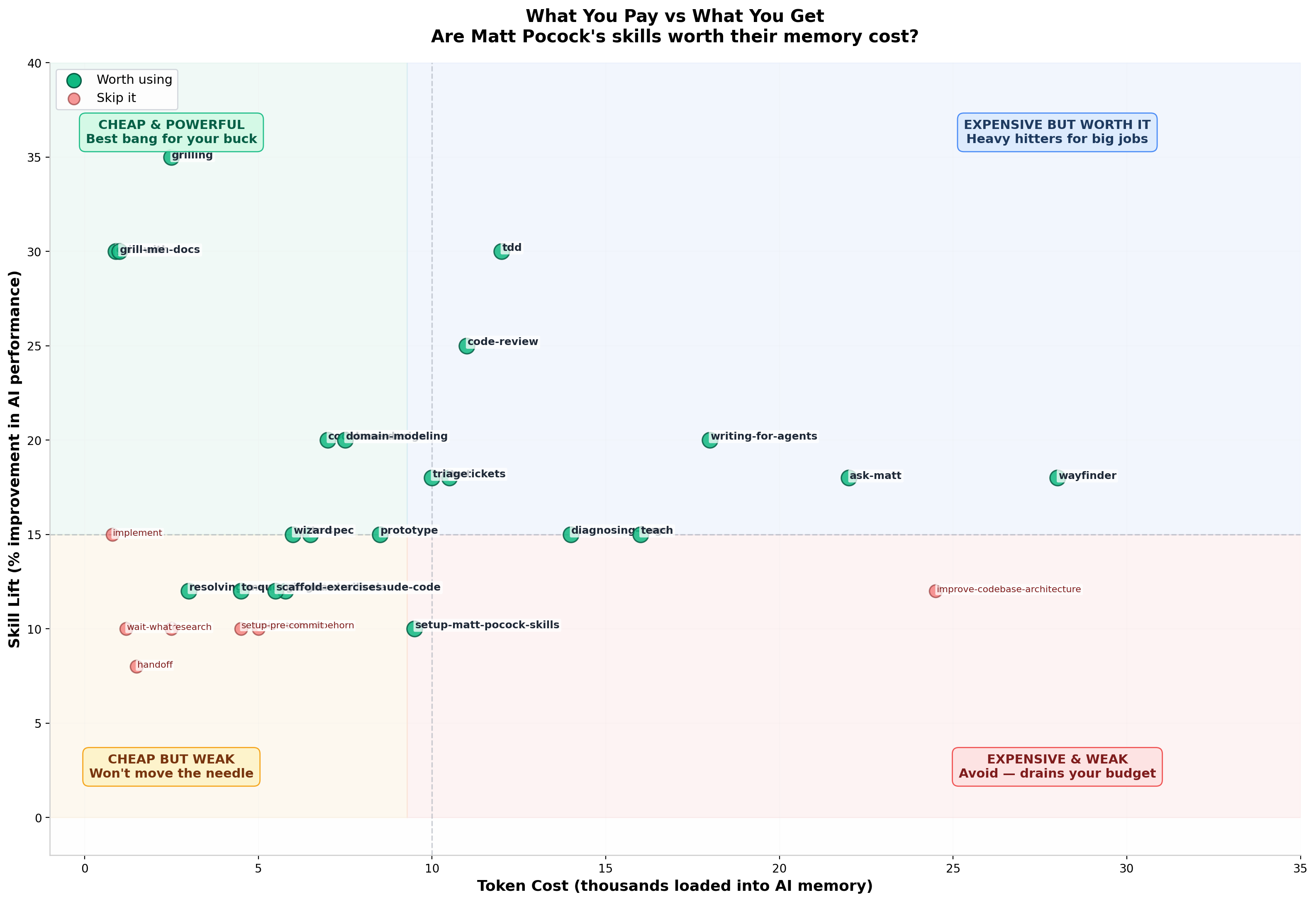
- Best Value:
grilling(2.5K tokens, ~35% quality lift). - Solid ROI:
tdd(12K tokens) andcode-review(11K tokens). - Poor ROI:
improve-codebase-architecture(24.5K tokens for only marginal improvement over simple prompting).
The Scorecard
| Skill | Score | Recommendation | Key Takeaway |
|---|---|---|---|
| grilling | 92 (A-) | Yes | The standout skill. Structured prerequisite interview. |
| tdd | 88 (B+) | Yes | Teaches test quality and anti-patterns. |
| code-review | 88 (B+) | Yes | Evaluates both specification accuracy and code health. |
| codebase-design | 90 (A-) | Yes | Strong architectural vocabulary and reference guides. |
| domain-modeling | 88 (B+) | Yes | Clarifies domain entities and aligns naming. |
| writing-for-agents | 90 (A-) | Yes | Excellent meta-guide for writing agent prompts. |
| wayfinder | 85 (B) | Yes | Good for navigating complex architectural decisions. |
| diagnosing-bugs | 85 (B) | Yes | Disciplined reproduction and debugging workflow. |
| prototype | 80 (B-) | Yes | Rapid throwaway exploration. |
| grill-me | 45 (F) | Skip | Thin wrapper. Use grilling directly. |
| grill-with-docs | 45 (F) | Skip | Wrapper. Use grilling + domain-modeling. |
| implement | 50 (F) | Skip | Wrapper. Call tdd and code-review directly. |
| improve-codebase-architecture | 78 (C+) | Skip | Heavy token footprint for HTML formatting. |
Summary
Matt Pocock’s skills repository contains genuinely strong ideas. The grilling interview flow and tdd anti-pattern guides are among the best prompt architectures available publicly.
While they lack the automated evaluation suites and version locking required for rigorous production CI pipelines, the core skills (grilling, tdd, code-review) will immediately improve your daily AI coding workflows.